Smart Heating Solutions
What Is a WiFi Thermostat and How Does It Work?
On a winter morning, a WiFi thermostat can let you adjust the heat before you leave bed. Nest co-founder Tony Fadell has called the thermostat “the most important device in your home.” His remark points to a practical truth: this small wall-mounted control can affect comfort and energy use every day. But what makes a WiFi thermostat different from a traditional one?
In simple terms, it connects to your home’s wireless network and lets you change settings through an app or, on some models, a web service. Sensors measure the room temperature. When it falls below or rises above your chosen setting, the thermostat signals compatible heating or cooling equipment to respond. You might set a weekday schedule, lower the temperature while away, or check the living room from your phone. The exact features vary by model and HVAC system. Some thermostats also learn patterns or work with room sensors, but those features are not universal.
There are limits. A weak internet connection may interrupt remote access, and a WiFi thermostat can still control equipment locally, depending on its design. Compatibility matters, too; wiring and system type can rule out certain models. Convenience is real. So is the need to check the details. This guide explains what a WiFi thermostat is, how its connections and controls work, and what to consider before choosing one. One honest caveat: “smart” does not automatically mean simpler.
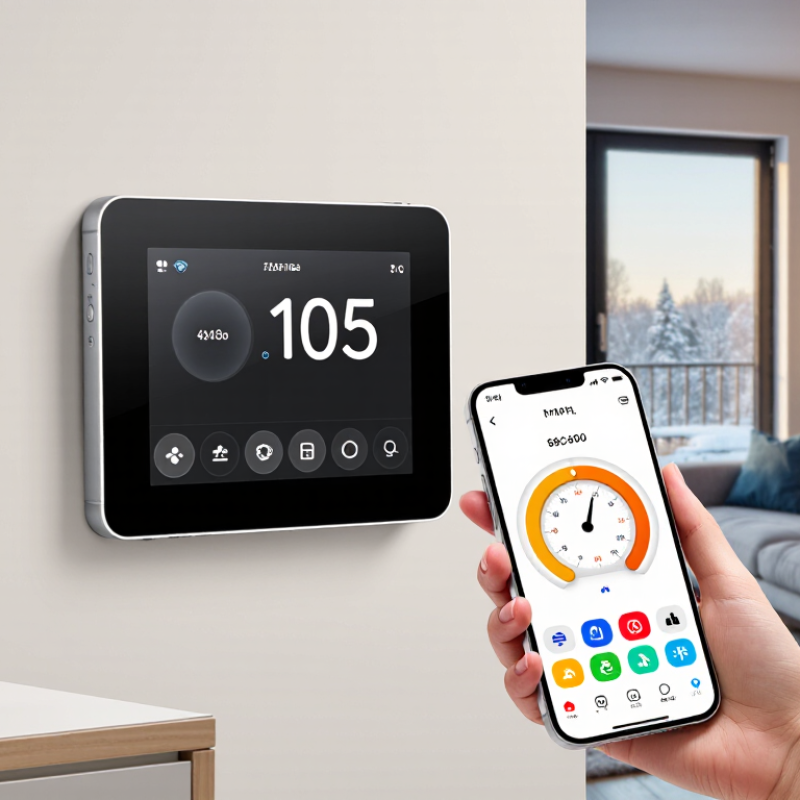
Definition and Main Purpose of a WiFi Thermostat
A WiFi thermostat is a temperature-control device that connects to a home’s wireless network. Like a standard thermostat, it signals compatible heating or cooling equipment to turn on or off as indoor temperatures change. Its WiFi connection adds remote access through a phone, tablet, or computer.
The main purpose is to let people manage indoor comfort more flexibly. A resident can adjust the temperature from another room, change a schedule while away, or check the current setting before returning home. Many models also support automatic schedules, but available features vary. That matters.
WiFi access does not make every home more comfortable or reduce energy use by itself. Results depend on the building, equipment, settings, and household routine. For example, a schedule may lower heating while a home is empty, yet frequent manual changes can undo it. Compatibility also matters: wiring and heating systems differ, so checking the device requirements before installation is sensible. A WiFi thermostat is best understood as a connected control, not an energy-saving guarantee.
What Is a WiFi Thermostat and How Does It Work? — Definition and Main Purpose
| Dimension | How It Works | Main Purpose or Practical Note |
|---|---|---|
| Definition | A WiFi thermostat is a heating and cooling control that connects to a home WiFi network. | It lets users adjust compatible HVAC settings at the thermostat or through an internet-connected device. |
| Temperature sensing | An internal temperature sensor measures the air near the thermostat. Some models can also use separate room sensors. | The measured temperature is compared with the selected setpoint to determine whether heating or cooling is needed. |
| HVAC control | Wired control signals tell compatible heating or cooling equipment when to start or stop. | The thermostat regulates indoor temperature; system compatibility and wiring requirements vary by equipment and model. |
| WiFi connection | The thermostat connects to a home router and exchanges settings and status information with an app or online service. | Remote features require a suitable network connection. Supported WiFi bands depend on the specific thermostat. |
| Remote access | A user can view or change supported settings in a mobile app or web interface while connected to the service. | This is useful for adjusting the temperature away from home or checking the current system status. |
| Schedules | Users can set different temperature targets for selected times or days; schedules are stored and followed by the thermostat. | Schedules can align heating and cooling with occupancy patterns. Actual energy savings depend on the building, system, and settings. |
| Learning and automation | Some models can use user-selected settings, occupancy signals, or other supported inputs to automate adjustments. | Automation features differ by model and may require setup, sensors, location access, or an active internet connection. |
| Power and installation | Power may come from a common wire, batteries, or another supported arrangement, depending on the model and HVAC wiring. | Check the thermostat’s wiring and system-compatibility requirements before installation; professional installation may be appropriate. |
| If WiFi is unavailable | Many models continue basic temperature control using their local settings, but app access and internet-dependent features may stop working. | Offline behavior varies by model, so consult its instructions for the supported functions during a network outage. |
Related Posts
-

Why You Should Consider a Workshop Heater for Your Workspace Efficiency?
-

10 Essential Tips for Choosing the Best Room Heaters for Your Home?
-

What is an Electric Heater and How Does It Work?
-

How to Choose the Best Wall Mounted Electric Heater for Your Home?
-
China Top Small Electric Heater Recommendations for Cozy Winters?
-
China Best House Heater Options for Global Buyers?